Aapka first automation: ek form, ek sheet aur ek automatic message, bina code ke
Automation technical lagta hai, lekin first automation ek afternoon me ban jata hai. Enquiry form ko sheet aur instant acknowledgement se connect karein, phir jahan help ho wahan AI add karein.
On this page
- Good first automation kaisa hota hai
- Step 1: Paper par draw karein
- Step 2: Form aur sheet banayein
- Step 3: Notifications add karein
- Step 4: Acknowledgement AI se likhwayein
- WhatsApp ke baare me ek note
- Step 5: Khud test karein
- Step 6: Jahan help ho wahan AI add karein
- Example
- 5 aur automations, baad ke liye
- Ise control me rakhein
- Ye mistakes avoid karein
Automation ka matlab hai ki koi routine step apne aap ho jaye, har baar, bina kisi ke yaad rakhe. First automation ke liye programmer ki zaroorat nahi. Aapko ek clear rule chahiye aur un bahut se tools me se ek jo apps ko bina code ke connect karte hain.
Good first automation kaisa hota hai
- Wo aksar hota hai.
- Rule kabhi change nahi hota: "jab X ho, tab Y karo".
- Mistake small hogi aur easily notice ho jayegi.
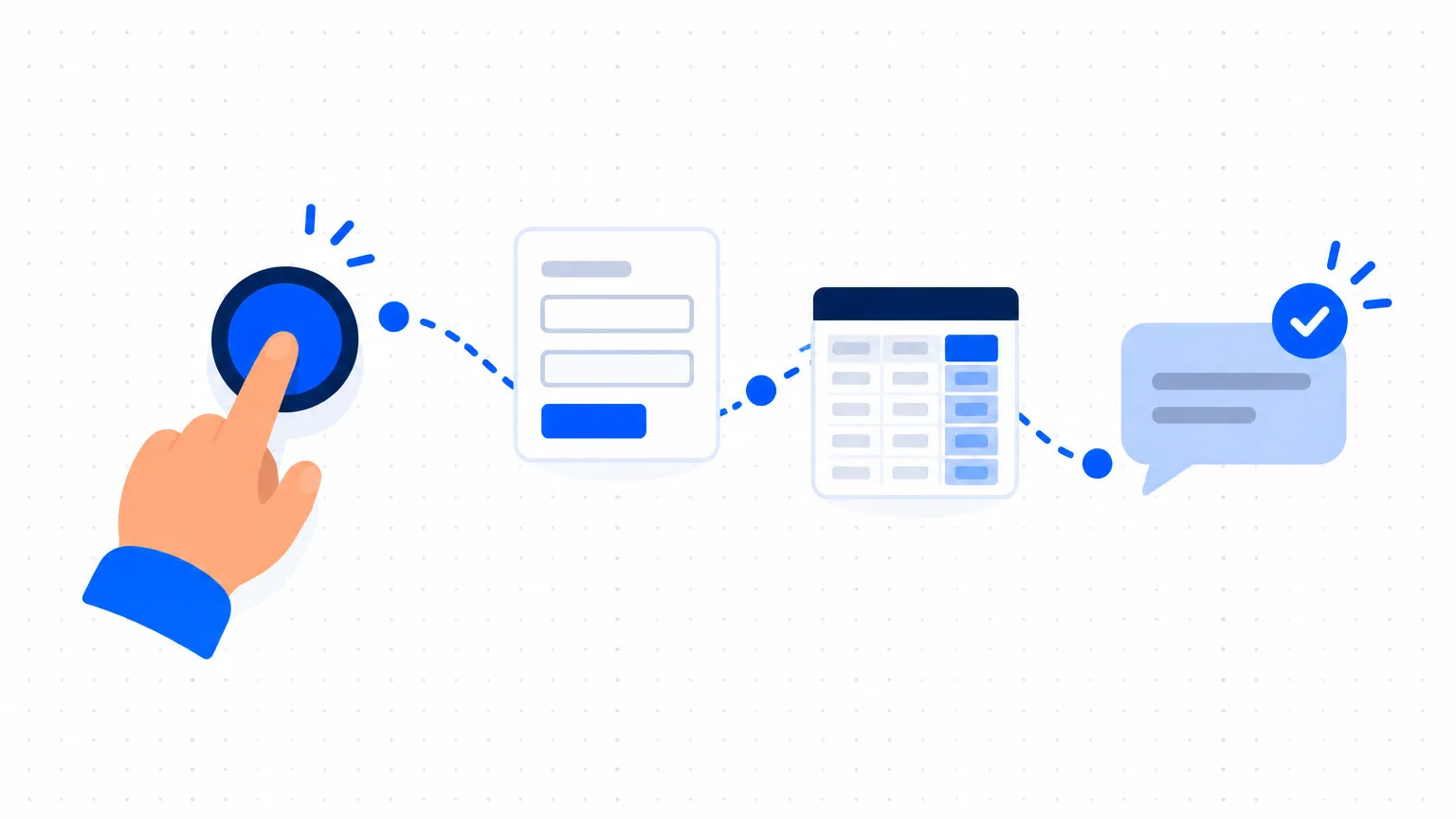
Small business ke liye classic first automation: jab koi enquiry form bhare, to enquiry sheet me save ho, team ko email jaye, aur customer ko acknowledgement mile.
Ye un 3 cheezon ko replace karta hai jo log busy days me bhool jate hain.
Step 1: Paper par draw karein
Rule ko ek chain ki tarah likhein:
- Trigger: customer enquiry form submit karta hai.
- Action: "Enquiries" sheet me ek row add ho.
- Action: sales person ko email ya message jaye.
- Action: customer ko acknowledgement jaye jisme likha ho ki aage kya hoga.
Agar aap ise itna simple nahi likh sakte, to ye abhi automate karne ke liye ready nahi hai.
Step 2: Form aur sheet banayein
Aisa form tool use karein jo spreadsheet me likhta ho. Google Forms ke saath Google Sheets free hai aur start ke liye kaafi hai. Enquiries ko fast qualify karein wale 5 questions poochein, aur ek consent line add karein: "I agree to be contacted about my enquiry."
Form link apni website, Google profile, Instagram bio aur WhatsApp Business quick reply me daalein.
Step 3: Notifications add karein
Zyadatar form tools har new response par aapko email kar sakte hain. Ye aapka first automation hai, 2 minute me done.
Customer ke acknowledgement aur aage ke kaam ke liye connector tool use karein. Ye wo services hain jo apps ko "when this, then that" rules se jodti hain. Well-known examples hain Zapier, Make aur Pabbly Connect. Bahut se business apps jo aap already use karte hain, jaise CRMs aur accounting tools, unme simple automation built-in hota hai. New tool ke liye pay karne se pehle check karein ki aapke existing tools kya kar sakte hain.
Step 4: Acknowledgement AI se likhwayein
Write a short acknowledgement message for a customer who has just filled in the enquiry form of a [type of business]. Thank them, tell them when and how we will reply ([your real reply time]), and give our phone number for urgent needs. Under 50 words, warm, simple English. No promises about price or availability.
Sirf wahi reply time promise karein jo aap sach me nibhate hain.
WhatsApp ke baare me ek note
Business ki taraf se automatic WhatsApp messages bhejne ke liye WhatsApp Business Platform chahiye, jo Meta ya uske kisi approved provider ke through set up hota hai. Jo messages aap start karte hain unke liye usually approved templates use karne padte hain, aur customer ne receive karne ke liye agree kiya hona chahiye. Free WhatsApp Business app me simple tools hain jo aap aaj hi use kar sakte hain: greeting message, away message aur quick replies. Wahin se start karein.
Step 5: Khud test karein
Customer ki tarah form 3 baar bharein: ek baar normally, ek baar ek field missing karke, ek baar long message ke saath. Check karein ki row, team alert aur acknowledgement teeno aaye, aur acknowledgement phone par padhein.
Step 6: Jahan help ho wahan AI add karein
Jab basic chain kaam karne lage, to AI ek useful step add kar sakta hai:
- Summarise aur sort: har new enquiry ko sheet ke next column me 2-line summary aur suggested group mile.
- Draft, send nahi: ek suggested first reply sheet me rakha jaye, jise ek person padhe, edit kare aur bheje.
Team ke liye simple AI rules wala rule rakhein: AI draft karta hai, person bhejta hai. Agar koi automation customer details kisi AI service ko pass karta hai, to pehle us service ke data terms check karein.
Example
Ek made-up home tuition service. Sirf chain dikhane ke liye.
Parents form bharte hain: class, subject, area, preferred time. Row sheet me aa jati hai. Coordinator ko email milta hai. Parent ko message milta hai: "Thank you. Hum aaj 7 pm se pehle tutor ki details ke saath aapko call karenge." Har evening coordinator sheet kholta hai, new enquiries ko call karta hai aur status mark karta hai. Kuch clever nahi, aur koi enquiry lost nahi hoti.
5 aur automations, baad ke liye
- Appointment se ek din pehle reminder.
- Job complete hone ke baad thank-you aur review request.
- Due date par payment reminder, jab ek person list check kar le.
- Owner ko sales summary ka weekly email.
- Birthday ya renewal reminder, jis par team act kare.
Ise control me rakhein
- One owner. Ek person jaanta ho ki har automation kaise kaam karta hai aur kahan hai.
- Ek list. Ek sheet jisme har automation ho: kya trigger karta hai, kya karta hai, kaun se accounts use karta hai.
- Weekly check. Last kuch runs dekhein. Jab form change hota hai ya password expire hota hai, to automations silently fail ho jate hain.
- Off switch. Pata ho ki har ek ko pause kaise karna hai.
Ye mistakes avoid karein
- Messy process ko automate karna. Pehle steps fix karein.
- Automatic replies jo person hone ka pretend karte hain. Batayein ki ye acknowledgement hai.
- Bina consent ke messages.
- First month me 10 automations. Ek banayein, 2 weeks chalayein, phir next.